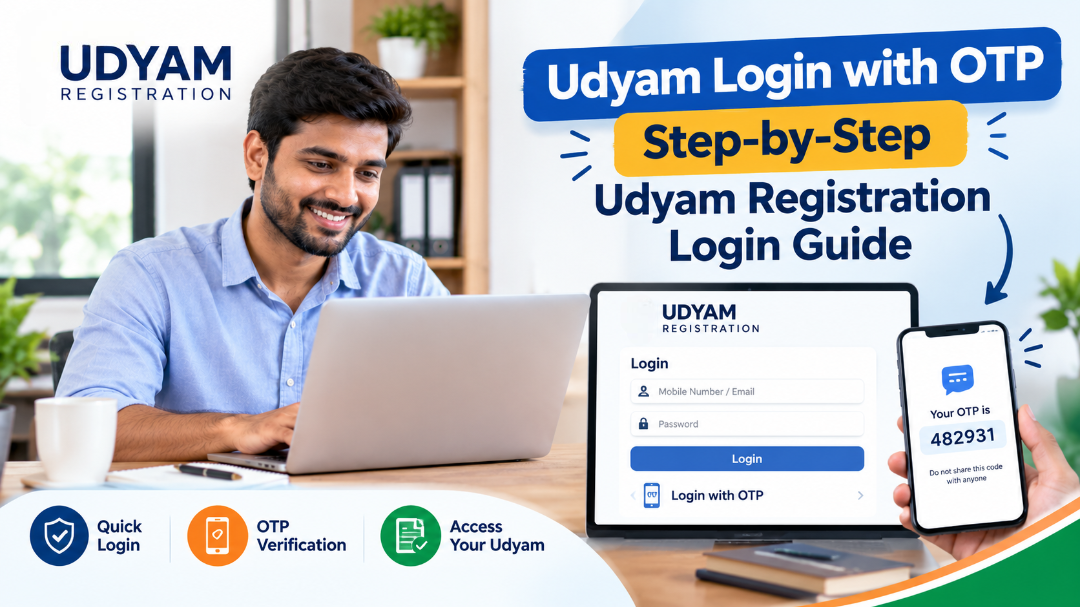
If you are looking for Udyam login with OTP, you can access the official Udyami Login facility using your Udyam Registration Number, the mobile number entered during registration, and an OTP. The Udyam Registration Portal currently provides OTP verification through either the registered mobile number or registered email address.
The Udyam login with OTP process is useful when you want to access your Udyam-related details online without creating a traditional username and password. However, it is important to use the correct Udyam Registration Number and the contact details that were provided in the application.
In this guide, you will learn how to complete Udyam login with OTP, what information is required, what to do if the OTP is not received, how to recover a forgotten Udyam Registration Number, and the difference between Udyam login, Udyog Aadhaar and other login options.
What Is Udyam Login with OTP?
Udyam login with OTP is the online verification process available on the Udyam Registration portal for registered enterprises.
Instead of using a conventional password-based account, the official Udyami Login page asks for:
- Udyam Registration Number
- Mobile number entered in the Udyam application
- OTP option
- Captcha/verification code
- OTP received on the selected mobile number or email
According to the official portal, the Udyam Registration Number follows the format UDYAM-XX-00-0000000. The portal then sends an OTP to the selected contact option after validation.
The official portal is operated under the Ministry of Micro, Small & Medium Enterprises. The government portal also states that Udyam Registration is online, paperless and based on self-declaration.
Udyam Login with OTP: What Do You Need?
Before starting the Udyam login with OTP, keep the following information ready:
1. Udyam Registration Number
You need your valid Udyam Registration Number.
The official login page gives the format as:
UDYAM-XX-00-0000000
Make sure you enter the number correctly. Even a small typing error can prevent successful verification.
2. Registered Mobile Number
The mobile number should be the number entered in the Udyam application.
The official Udyam login page specifically asks for the mobile number filled in the application.
3. Registered Email
The official login facility also provides an option to receive the OTP through the email address filled in the application.
4. Captcha/Verification Code
A verification code is also required before generating the OTP.
5. OTP
After the details are validated, an OTP is sent to the selected contact option. You then enter the OTP to complete the login.
How to Do Udyam Login with OTP Online?
The Udyam login with OTP process is straightforward when you have your registration number and registered contact details.
Step 1: Open the Official Udyam Portal
Visit the official Udyam Registration website.
Official Udyam Registration Portal
The official website warns users about fake websites and states that the government Udyam portal is the official platform for the registration process.
Step 2: Select Udyami Login
Go to the Udyami Login section.
The official page is titled “Udyami Login After Verification With OTP.”
Step 3: Enter Udyam Registration Number
Enter your complete Udyam Registration Number.
For example, the official portal displays the format:
UDYAM-XX-00-0000000
Check the number carefully before proceeding.
Step 4: Enter Your Registered Mobile Number
Enter the mobile number that was provided in your Udyam application.
The official login facility requires a 10-digit Indian mobile number beginning with 9, 8, 7 or 6.
Step 5: Select an OTP Option
You can choose where you want to receive the OTP.
The official portal provides two options:
- OTP on mobile as filled in the application
- OTP on email as filled in the application
Step 6: Enter the Verification Code
Enter the captcha/verification code shown on the screen.
The verification code is case-sensitive according to the official login instructions.
Step 7: Generate OTP
Click the button for Validate & Generate OTP.
The system will verify the information and send the OTP to your selected contact option.
Step 8: Enter the OTP
Enter the OTP you receive.
Avoid sharing the OTP with anyone. An OTP is intended for verification of the account or transaction being performed.
Step 9: Complete Login
Click Validate OTP & Login.
If the details and OTP are successfully validated, you can proceed through the available Udyam login facility.
Udyam Registration Login with OTP: Quick Process
For a quick understanding, the process can be summarized as:
Udyam Registration Number → Registered Mobile Number → OTP Option → Captcha → Generate OTP → Enter OTP → Validate OTP & Login
This is the current process shown on the official Udyam login page.
Can I Do Udyam Login with Mobile Number Only?
Generally, the current Udyam login with OTP page requires more than just the mobile number.
The official login facility asks for:
- Udyam Registration Number
- Mobile number filled in the application
- OTP option
- Verification code
Therefore, simply entering a mobile number is not the complete login process.
If you have forgotten your Udyam Registration Number, the official portal provides a separate facility for recovering it using OTP verification.
What If I Forgot My Udyam Registration Number?
If you do not remember your Udyam Registration Number, you do not necessarily need to create another registration.
The official portal has a Forgot UAM/Udyam Registration Number facility.
You can select:
- Udyog Aadhaar Memorandum, or
- Udyam Registration
Then select an OTP option:
- Mobile
Enter the relevant mobile number or email address and generate an OTP.
After successful OTP verification, the portal states that the registered numbers can be displayed.
Forgot UAM/Udyam Registration Number
Udyam Login with OTP Not Working: Common Reasons
Sometimes users enter the correct details but still cannot complete the login. There can be several reasons.
1. Incorrect Udyam Registration Number
Check every character in your Udyam number.
Do not confuse:
- Udyam Registration Number
- Udyog Aadhaar Number
- Application/reference details
The current Udyam login page specifically requires the Udyam Registration Number.
2. Wrong Mobile Number
The mobile number needs to match the number entered in the Udyam application.
If you are using a different mobile number, the OTP verification may not work.
3. OTP Sent to Email Instead
If you selected the email option instead of mobile OTP, check the registered email inbox.
Also check:
- Spam folder
- Junk folder
- Promotions folder
4. OTP Has Expired
OTP-based verification generally requires you to enter the current OTP within the permitted period. If the OTP has expired, generate another OTP through the portal.
5. Incorrect Captcha
The official login page uses a verification code that is case-sensitive. Enter it exactly as displayed.
6. Temporary Technical Problem
Website traffic, browser problems, network issues or temporary technical errors can sometimes interfere with online verification.
Try:
- Refreshing the page
- Opening the portal again
- Using another browser
- Clearing browser cache
- Checking your internet connection
What to Do If Udyam OTP Is Not Received?
If you are trying Udyam login with OTP and the OTP has not arrived, check the following.
Check Your Mobile Network
Make sure your phone has network connectivity and can receive SMS.
Verify the Registered Number
Confirm that you are using the mobile number associated with the Udyam application.
Check Email
If you selected email OTP, check the registered email account, including spam or junk folders.
Wait Briefly Before Requesting Another OTP
Repeatedly requesting OTPs may create confusion because multiple OTP messages can arrive at different times.
Try Again Later
If the portal or messaging service is experiencing a temporary technical issue, trying again later may help.
If the issue continues, use the official Udyam portal's available grievance/help facilities rather than sharing your OTP or sensitive information with an unknown person.
Is Udyam Login the Same as Udyog Aadhaar Login?
No. Udyam Registration and the older Udyog Aadhaar Memorandum (UAM) system are not the same registration system.
The official Udyam portal provides a separate process for enterprises that previously had UAM registrations and need to move to the Udyam system.
The current Udyam Registration system assigns a permanent Udyam Registration Number after registration. The official portal also states that an online Udyam Registration Certificate is issued after completion of registration.
Therefore, when searching for Udyam login with OTP, make sure you are using the current Udyam login facility rather than confusing it with older Udyog Aadhaar services.
Udyam Login with OTP vs Udyog Aadhaar
| Feature | Udyam Registration | Udyog Aadhaar |
|---|---|---|
| Current MSME registration system | Yes | Older system |
| Udyam Registration Number | Yes | No |
| OTP-based verification | Yes | Was used for related processes |
| Online certificate | Yes | Older UAM document |
| Registration renewal | No periodic renewal stated | Older system |
| Official portal | Udyam Registration Portal | Legacy UAM-related facilities |
The official Udyam portal says enterprises having EM-II or UAM registration need to re-register under the Udyam system.
Can I Login to Udyam Without OTP?
The current individual Udyami Login page is specifically designed around OTP verification.
The official instructions say to:
- Enter the Udyam Registration Number.
- Enter the mobile number filled in the application.
- Choose an OTP option.
- Enter the verification code.
- Validate and generate OTP.
- Enter OTP.
- Validate OTP and log in.
Therefore, if you are using the regular Udyami Login facility, OTP verification is part of the login process.
Is Aadhaar Required for Udyam Login?
Aadhaar is important for the Udyam Registration process, but the current Udyami Login page does not ask you to enter Aadhaar as the login credential.
The official registration form requires Aadhaar verification during registration. The applicable Aadhaar holder depends on the organisation structure.
For example:
- Proprietorship: proprietor's Aadhaar
- Partnership: managing partner's Aadhaar
- HUF: karta's Aadhaar
For certain organisations such as companies and LLPs, the official registration process also involves PAN/GSTIN requirements as applicable.
This means Udyam login with OTP and Aadhaar verification during registration are two different steps.
Can I Get Udyam Certificate After Login?
Udyam Registration provides an online certificate after completion of the registration process.
The official portal states that the certificate contains a dynamic QR code through which the enterprise's webpage and details can be accessed on the portal.
After successful authentication, you can use the appropriate services available through the official Udyam portal for your enterprise.
If you are trying to access or verify certificate details, always check that the information belongs to your own enterprise.
Important Safety Tips for Udyam Login with OTP
When using Udyam login with OTP, follow basic online safety practices.
Use the Correct Website
Use the official Udyam Registration portal:
The official website warns users about fake websites and says that the government portal is the official Udyam Registration platform.
Never Share Your OTP
Do not share an OTP with:
- Unknown callers
- Unverified agents
- Social media accounts
- Unknown websites
- Anyone claiming to need your OTP for verification
Check the Website Address
Before entering your registration number or contact information, check the website address carefully.
Do Not Create Multiple Registrations
The official portal states that an enterprise should not file more than one Udyam Registration. Multiple activities can be specified or added under one registration where applicable.
Udyam Registration Portal Login: Important Points
The Udyam registration portal login system is designed for registered enterprises to authenticate through OTP.
Remember these points:
- Keep your Udyam Registration Number ready.
- Use the mobile number entered in the application.
- You can select mobile or email OTP.
- Enter the captcha correctly.
- OTP verification is required for the regular Udyami Login.
- If you forgot your registration number, use the official recovery facility.
- Do not share your OTP.
- Use the official government portal.
- Udyam Registration itself is stated by the official portal to be free of cost.
- Udyam Registration and old Udyog Aadhaar are different systems.
Frequently Asked Questions About Udyam Login with OTP
1. What is Udyam login with OTP?
Udyam login with OTP is the verification-based login process for registered enterprises. It requires the Udyam Registration Number, registered mobile number and OTP verification. The official portal also provides email OTP as an option.
2. Can I login to Udyam using OTP?
Yes. The official Udyami Login page uses OTP verification after entering the required registration and contact details.
3. Which mobile number should I use for Udyam login?
You should use the mobile number entered in your Udyam application.
4. Can I receive Udyam OTP on email?
Yes. The official Udyami Login page provides an option to receive OTP on the email address filled in the application.
5. What if I forgot my Udyam Registration Number?
You can use the official Forgot UAM/Udyam Registration Number facility and verify your registered mobile number or email using OTP.
6. Can I login to Udyam with Aadhaar?
The current Udyami Login page requires the Udyam Registration Number and registered contact details rather than Aadhaar as the login credential. Aadhaar is used during the registration process.
7. Why am I not receiving the Udyam OTP?
Check whether you are using the registered mobile number or email, verify your network/inbox, and make sure the captcha and other details are correct before generating another OTP.
8. Is Udyam login the same as Udyog Aadhaar login?
No. Udyog Aadhaar was the earlier UAM system. Udyam Registration is the current MSME registration system. The official portal provides separate information for UAM migration/re-registration.
10. Do I need a password for Udyam login?
The current Udyami Login page is based on OTP verification rather than asking the applicant to create a conventional password for this login process.
11. Can I use another mobile number for Udyam login?
The official login instructions specify the mobile number filled in the Udyam application. Therefore, using an unrelated mobile number may not complete verification.
12. What is the format of the Udyam Registration Number?
The official login page displays the format as UDYAM-XX-00-0000000.
13. Can I recover my Udyam number through OTP?
Yes. The official portal has a dedicated recovery facility where you can choose Udyam Registration and receive OTP on the registered mobile number or email.
14. Is Udyam Registration permanent?
The official portal states that a permanent Udyam Registration Number is assigned after registration and that there is no need for periodic renewal of the registration.
15. Where should I perform Udyam login?
Use the official Udyam Registration portal at udyamregistration.gov.in and avoid websites that falsely present themselves as government registration portals.
Conclusion
The Udyam login with OTP process allows registered enterprises to authenticate through their Udyam Registration Number and registered contact details. The current official Udyami Login page provides OTP verification through either the mobile number or email address recorded in the application.
If you know your Udyam Registration Number, keep your registered mobile or email available, enter the captcha correctly and complete OTP verification. If you have forgotten the registration number, the official portal provides a separate OTP-based recovery facility.